
Making Tax Digital – Income Tax
Making Tax Digital for Income Tax (MTD IT) requires businesses and landlords with qualifying income to maintain digital records and submit quarterly updates to HMRC using approved software such as KEYinfinity.
KEYinfinity supports the quarterly submission process but does not handle the final declaration, as this stage involves claims, reliefs, and other declarations that go beyond standard bookkeeping. However, all quarterly data entered in KEYinfinity can be exported for refinement and final submission by your Accountant using their existing systems.
Preparing for MTD – Income Tax
KEYinfinity can process both self‑employment and property income within a single accounting dataset, without creating additional nominal codes. You can continue using your existing structure of Groups, Nominals, Enterprises, and Analysis Codes. Once you have enrolled with HMRC for MTD IT, the correct HMRC tax categories must be applied to each submission entity—or to multiple entities when managing several income streams.
To support your preparation, we provide an Excel MTD_IT Preparation Template (see below) that helps map your current nominal codes to HMRC submission categories. This template covers both Property and Self Assessment businesses. You can transfer your trading nominal codes—such as Sales, Purchases, Fixed Direct Costs, Overheads, and where relevant Valuation Adjustments and Depreciation—into the spreadsheet. Each trading nominal code must be mapped to one of the 18 HMRC Income or Expense categories in line with template guidance, HMRC field notes, or your Accountant’s advice.
Landmark Systems are not tax specialists and cannot advise on how your nominal codes should be categorised. For any queries relating to allocation, please consult your Accountant or Tax Adviser.
If mapping multiple MTD submissions, the same nominal can be assigned to different categories, as transactions are directed to the correct MTD entity using Enterprises or Analysis codes thereafter. See Overview of Mapping for further detail.
Completing this mapping as early as possible will ensure you are fully prepared for your first MTD IT submission in August 2026.
Sign Up with HMRC: Check Your Eligibility First
HMRC has opened enrolment for MTD IT for the 2026/27 tax year. Before signing up, you will need to confirm that you have:
- Been registered for Self Assessment
- Submitted a tax return in the last 2 years
You must also meet the income threshold for your start year.
Setting Up a Taxable Entity
For individuals, MTD IT becomes mandatory from April 2026 for those with more than £50,000 in qualifying income. For these taxpayers, MTD IT replaces the traditional Self Assessment process and becomes the required method of reporting.
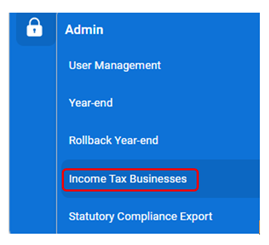
Access is granted to Self Assessment, via Admin > Income Tax Businesses
To enable a new Self Assessment business, click on Connections
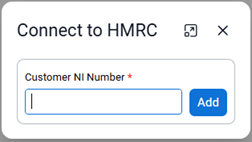
Enter your National Insurance number and follow the instructions for signing into your Government Gateway account (or your Agent Services Account if acting on behalf of a client).
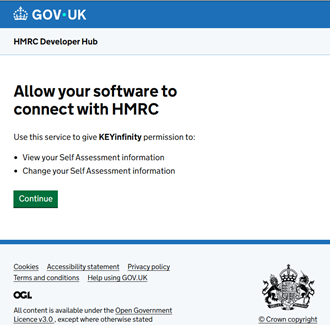
This will allow you to create the Tax Business(s) linked to the National Insurance number provided and then retrieve and complete the obligations when due. The authorisation grant is expected to remain valid for 18 months, similar to the expiry period used for MTD VAT.
Before making any submissions, you may choose to report using calendar quarters instead of the standard quarterly periods ending on 5 July, 5 October, 5 January, and 5 April. However, the submission deadlines remain unchanged. The election must be made before your first submission is filed. Once a submission has been made, the reporting basis cannot be changed.
Each submission shows the cumulative totals for the period(s) so far:
Q1 – 6th April to 5th July – due 7th August
Q2 – 6th April to 5th October – due 7th November
Q3 – 6th April to 5th January – due 7th February
Q4 – 6th April to 5th April – due 7th May

Was this article helpful?
That’s Great!
Thank you for your feedback
Sorry! We couldn't be helpful
Thank you for your feedback
Feedback sent
We appreciate your effort and will try to fix the article