
To ensure that the appropriate tax return categories are correct, you will need to map each of the income and expenditure nominals on your chart of accounts to the appropriate Self Assessment category. Balance sheet nominals are not required, as they are not included in the quarterly submissions.
- From the Menu ribbon go to Admin > Income Tax Businesses
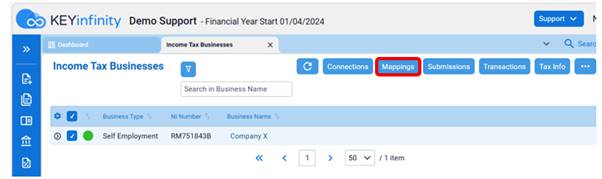
- Tick the taxable business entity you want to create the mappings for and click Mappings
- To import your mapping of income and expense nominals from the Excel MTD_IT Preparation Template: Go to
 > Import > Upload > Choose your file and open. This will now show all the mapped nominals.
- If you have not prepared with our spreadsheet: Click on the HMRC Category column and choose one category based on the nominal group types
- Sales = Turnover Income
- Misc Receipts = Other Income
- Purchases = Cost of Goods Allowable
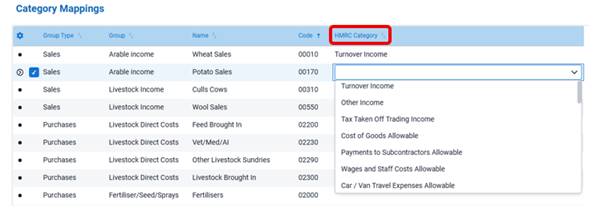
- If a nominal is not relevant to the taxable business entity select Not Applicable
- Once you have mapped all the relevant nominals click Save top right
NB A nominal can belong to more than one Taxable Entity.

Was this article helpful?
That’s Great!
Thank you for your feedback
Sorry! We couldn't be helpful
Thank you for your feedback
Feedback sent
We appreciate your effort and will try to fix the article